

monday.com Implementation Consultant
5 minutes
monday service | ticket management | support tickets
monday service | monday support tickets | monday AI features
Support desks | Customer success teams
If you’re a small to medium enterprise (SME), your team probably wears multiple hats, including that of customer support. We know that sometimes, a full-blown support team answering to every query is not possible yet, leaving you or your team taking on these additional tasks.
This is why setting up monday service to handle support tickets can be a game-changer. This article will walk you through its best features, how to set up a simple but powerful support workflow, plus how to supercharge it with automations and monday AI features to keep those support tickets at bay!
Using monday service is a no brainer. For those already familiar monday.com work management platform, it uses the same boards, columns, and rows (called “items”) to manage your support tickets. Each support request becomes a ticket, displayed as a row on your board. You can group them by ticket status (e.g., Open, In Progress, Resolved), request type, or even by priority.

With monday service, you can:
Assign a ticket to the right teammate using a People column.
Customize statuses and track the lifecycle of a ticket from New to Closed, however you want it.
Set target resolution dates for each ticket.
Organize tickets into categories by setting up groups and filters.
Upload attachments and keep notes in the ticket item itself.
Even for those not yet using monday.com, this table-style setup is by default intuitive. You don’t need to learn a whole new system. The best part? You can build your all-in-one platform inside monday.com for your company instead of using different tools.

The first step is connecting your incoming support channels to monday. You can turn emails into support tickets by setting up a board with an email address (e.g. support@yourcompany.com) that automatically creates new items when someone sends in a message.
You can also create a monday form directly inside your monday service board which you can post in your website or send to clients which they can answer.
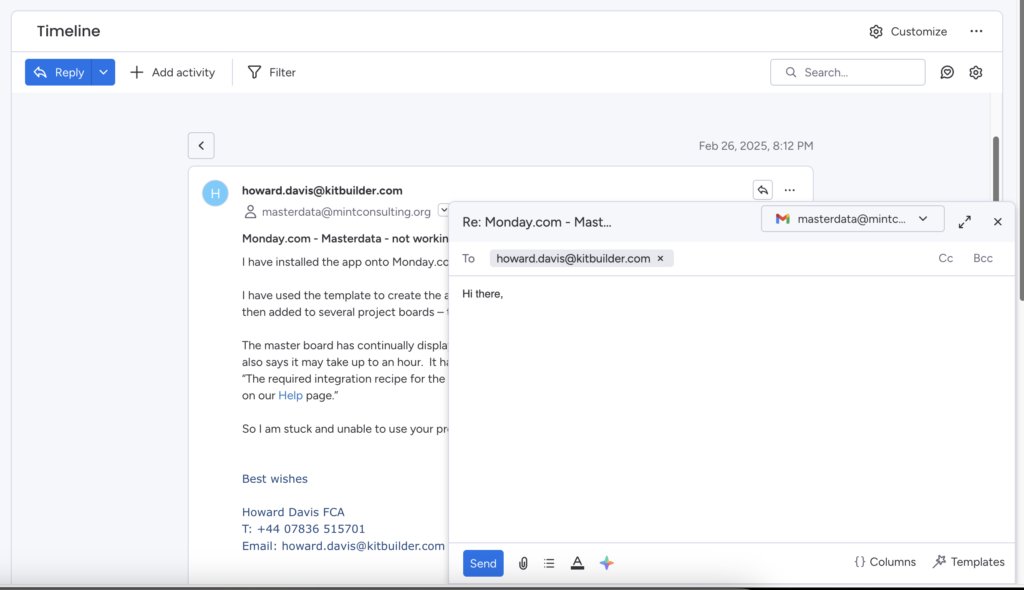
Once the support ticket is in, you don’t even have to leave monday.com! Emails & Activities lets you send and receive emails directly inside the item view. Continuity is not a problem, because every reply and note is kept in place.
Take your monday service further with monday’s native automations. Automations do repetitive tasks for you, like:

Automatically start and stop timers to track ticket resolution time from the moment the ticket is created until it is resolved.
Notify a person by creating an automation that sends a monday notification or Slack message.
Send emails to Assigned Person: You can automatically send a templated email to the person assigned to the support ticket, for those who need nudges when something hits their queue.
The built-in monday AI features add an extra layer of intelligence to your workflows by handling the repetitive, time-consuming parts of customer support. With monday AI, you can enjoy:
AI Service Agent. The AI assistant can suggest personalized responses to tickets based on your knowledge base and historical interactions. This helps your team offer accurate, consistent answers without digging through old replies.
Auto-Categorization: Incoming support tickets are automatically tagged by type, urgency, sentiment, or department. No more manual sorting. monday AI triages them for you the moment a request lands.
Smart Routing: Based on the content of the ticket, AI routes it to the right person or team. For example, anything mentioning “invoice” goes straight to Finance.
AI-Generated Replies: AI can draft email replies using pre-approved templates and tone. You can even configure it to auto-reply if it’s confident enough, helping reduce wait times for common inquiries.
Sentiment Detection: AI analyzes the emotional tone of each message. It can flag urgent or angry tickets to prompt you for a faster response.
These features sounding too good to be true? Discover for yourself how monday service can take away tons of hours and effort from managing those support tickets.
Perfect for SMEs, you can expect to level up your support management workflow as monday service gives you all the building blocks. No code needed, fully customizable, and supercharged by automations and monday AI features.
📅 Book in for a free 30-minute consultation, on us!
Collect all tasks across different monday.com boards on one master board providing complete visibility and control over your data.
✓ No credit card required ✓ Get a free 14-day trial

Mint Consulting Australia Pty Ltd (ABN: 13 629 524 572) is a Sydney-based CRM and Salesforce Managed Services consultancy specializing in implementations, integrations, and business strategy, supported by a skilled local team of consultants, solution architects, and developers.
Get a FREE 14-day monday.com trial